Fans Facebook
Related Posts Plugin for WordPress, Blogger...

Wednesday, July 4, 2012

Download Facebook Account To Your Computer

Hello there,
Today I will teach how to we can download our FaceBook profile all details including wall posts, photos, videos, links, and all other contents we have added to our profile, now we are going to see how to we can do this,
Fist you must log on to your FaceBook account, then you can see top tabs like home, profile, find friends and account tabs, click on the account tab,

[Image: image001.jpg]


Then select account settings option then you will see account settings page, at this screen you can see download your information option, then you can select learn more link, now you will see next step all information about downloading your account, it is give some warring to us this information contain some sensitive details like our personal details. After reading and understand all of the information you can click on download button, Smile
[Image: image002.jpg]

After clicking above button, popup window as confirmation window, click on download button, Tongue

[Image: image003.jpg]

Now you will notify, as “you will receive email your download is ready for download” now you can get this all information as zip file. Now you can extract this file in any local directory then you can brows your all account details as locally.

Googlebot Crawl Issue Identification Through Server Logs

The author's posts are entirely his or her own (excluding the unlikely event of hypnosis) and may not always reflect the views of SEOmoz, Inc.

Sifting through server logs has made me infinitely better at my job as an SEO. If you're already using them as part of your analysis, congrats - if not, I encourage you to read this post.

In this post we’re going to:

Briefly introduce a server log hitUnderstand common issues with Googlebot's crawlUse a server log to see Googlebot's crawl path.Look at a real issue with Googlebot wasting crawl budget and fix it.Introduce or reacquaint you with my favourite data analyzer.

It’s critical to SEOs because:

Webmaster tools, 3rd party crawlers and search operators won’t give you the full story.You’ll understand how Googlebot behaves on your site, and it will make you a better SEO.

I’m going to casually assume that you at least know what server logs are and how to obtain them. Just in case you've never seen a server log before, let's take a look at a sample "hit".

Each line in a server log represents a "hit" to the web server. The following illustrations can help explain:

File request example: brochure_download.pdf

A request for /page-a.html will likely end up with multiple hits because we need to get the images, css and any other files needed to render that page.

Image credit: Media College 

Every server is inherently different in logging hits, but they typically give similar information that is organized into fields. Below is a sample hit to an Apache web server, and I've purposely cut down the fields to make this simpler to understand:

50.56.92.47 - - [31/May/2012:12:21:17 +0100] "GET" - "/wp-content/themes/esp/help.php"  - "404" "-" "Mozilla/5.0 (compatible; Googlebot/2.1; +http://www.google.com/bot.html)" - www.example.com - Mozilla/5.0 (compatible; Googlebot/2.1; +http://www.google.com/bot.html)/wp-content/themes/esp/help.phpIn reality, there are many more fields and a wealth of information that can only be gained through web server logs. 

Specifically in regards to SEO, we want to make sure that Google is crawling the pages we want to be crawled on our site - because we want them to rank. We already know what we can do internally to help pages rank in search results, such as:

Ensure the pages are internally linked.Keep important pages as close to the root as possible.Ensure that the pages do not return errors.This is all typically standard stuff and you can get this information easily without server logs, but I want more, I want to see Googlebot.I want to look for Googlebot specific issues like:Unnecesary crawl budget expenditurePage it considers important / not importantIf there are any bot trapsIs Google making up 404 errors by trying to make up URLs (think JavaScript)Is Google trying to fill out forms? (Yes, it happens)Step 1:  Get some server logs.

Ask your client, or download a set of server logs from your hosting company. The point is to try and capture Googlebot visiting your site, except we don’t know when that’s going to happen – so you might need a few days worth of logs, or just a few hours.

To give you a real example:

Example domain has a PageRank of 6, DA of 80 and receives 200,000 visits a day.  Their IIS server logs will amount to 4gB a day, but because the site is so popular, Googlebot visits at least once a day.

In this case, I would recommend a full day worth of logs to ensure we catch Googlebot.

Head over to http://www.splunk.com, sign up and download the product – free edition.

Note: the free edition will only let you upload 500mb per 24 hours.

I would recommend that you put your server logs on you local machine to make this process nice and easy.

I've put together a quick few screencasts, I know they sound cheesy, but whatever.

Simply click on the Export link and wait for your massive CSV to download. (Note: If the link doesn't appear, it's because the search isn't finished yet)

Every time Googlebot came by the site, it spent most of it's time crawling PPC pages and internal JSON scripts. Just to give you an idea of how much time and crawl budget was wasted, please see below:

The real problem is that we had pages on the site that hadn't been indexed, and this was the cause. I wouldn't have found this without the server logs and I'm very grateful I did.

It's possible to crawl or visit a site using the Googlebot user agent, and even worse - it's possible to spoof the Googlebot IP. I always double check a list of IPs to what I see in the server log report and I use the method officially outline by Google.

1) Crawling PPC pages

I checked that these pages weren't indexed or receiving any traffic first, then I used robots.txt to block only Googlebot from these pages. I was very careful about this since I wanted to make sure that I didn't block Google Adbot (the robot that needs to crawl PPC pages).

User-agent: GooglebotDisallow: /*/cppcr/Disallow: /cppcr

2) Infinite GET requests to JSON scripts

This was just another simple robots.txt block because Google didn't need to request these scripts. Googlebot basically got caught in a form, over and over again. Realistically, there's no reason for any bot to crawl this, so I set the user-agent to all (*).

User-agent: *Disallow: /*/json/Disallow: /json

I'm pretty happy to say that a week later, there was an increase of 7,000 pages in the index as reported by Webmaster tools. 

Rand wrote about some good tips to prevent crawling issues, so I recommend you checking it out, as well as special thanks to the folks at ratedpeople.com for being kind enough to let me analyze and experiment on their site.

Additional resources

Feel free to follow me on Twitter @dsottimano, don't forget to randomly hug a developer - even if they say they don't like it :)


View the original article here

How to Write Email to Get a Better Response Rate

A successful SEO campaign is the perfect combination of all strategies. Whether you're working with on-page optimization, content development, social media, or link building, all of these factors contain equal value. When it comes to picking the most difficult SEO strategy, I will always give my vote to link building as this part is one of the most difficult, boring ,and time consuming strategies you can implement.
A few days back, I shared a picture of the perfect bedroom for a link builder on Facebook:

Almost perfect, despite the coffee pot missing ;)

Yes, link building can be boring, tough, and time consuming. However, one person on the team can dive into link building and get their hands dirty to get the job done in order to produce effective and action-driven results for the business.
Many people use different tactics when it comes to link building. One of the famous and most effective techniques that almost every ethical SEO uses is to manually outreach to other webmasters and ask for a link. Although the rate of response can be low, implementing a few smart email writing tactics can actually increase the response rate.
In this post, I will discuss a few tactics that I have used in recent campaigns where I had to write good amount of manual email to a variety of influencers and bloggers to ask them for a link favor. I tried out a few different ideas and finally created a format that allowed me to write every email as personalized as possible, while saving a lot of my time.
Here I go!
The first section of an email everyone reads is the title. It is important to have a catchy title or else your email will soon be sent directly to the trash bin. Do not try to manipulate the reader by creating false title, but instead create a title that is interesting and captivating to act as a perfect lead-in for the valuable content of the email.
Some good examples of titles are:
Rand, your comments on my link prospect research will be valuableWould appreciate if you allowed me to guest post on your blogSam, would appreciate if you could remove our link from your footer bar (Penguin friendly)
This is an extremely important factor. Do not write a one-line email that clarifies nothing. You want to make sure your email's content delivers the intended actions and requests in a concise, yet inclusive, manner. Similarly, do not stuff the email with tons of unnecessary information. In either case, the recipient is likely to delete your message right away without even reading it (yeah, I can see you having a déjà-vu here).
A perfect email should have, more or less, two paragraphs that describe the solid reason for writing that email.
Not rocket science, but always a good reminder! Use the intended recipient's name while asking them for a favor, or do not expect them to reply back. The people you are writing to are busy just like you, and their to-do lists are already filled with tasks to accomplish. You better make your request sounds important, and that starts with using their name. How many times have you ignored emails addressed to ‘Hello Webmaster,’ or similar? Plenty.
Take a little step forward, do your research, search for their names, and use them! After all, it is all in the name!
Example:
Hello Jennifer,

If you are writing an email of 100 words or more, it is important that your first paragraph should be appealing, smart, and engaging enough to encourage your reader to happily continue their journey through the end of the message. I've tried different formats and ideas for emails, but what stuck best with my campaign was to dedicate the entire first paragraph to the receiver.
This may sound like a lot of work, but checking the social profiles and doing some background on your recipient can tell you an enormous amount about a person. Ultimately, this will let you to talk to him or her more comfortably.
Example:
Hello Jason,
It was great to see your interview and find out more about you on ‘Alessio Madeyski’s’ post. After reading your advice on SEO, I believe you are the right person to ask for an opinion on my research.
OR
Hello Ann,
I am your continuous reader of your different blogs that include Daily SEO tips, my blog guest, and other platforms where you write. I think you are one of the best bloggers who has a great style of writing, and your ability to put down complex problems on paper make them easy to read and comprehend.Don’t drag, just say it!
Now that you've hit the second paragraph, you've made it to the ground floor of your email. If you are going to drag your point out a little longer, then you will probably lose the interest of the recipient. Try to be direct in the second paragraph and let the reader know what you want from him or her. Try to explain your objective in few lines and move towards the end of your note.
Example:
I actually took a step forward to help a specific niche outside of SEO (as much is already happening in the SEO bubble). In order to do that, I researched and compiled a list of 3K+ link prospects which any travel website/blog can use to get authority links.
OR
Although I'm advanced in SEO knowledge, I am planning to start writing and sharing my views to the blogging world and collect feedback that will help me grow as a better professional.Now that you have done your job in describing your objective behind the email, it is time to sum it up nicely in a courteous way.
I would love if you could take two minutes to look over the data and pass along your feedback.
Waiting for your reply!
Regards,

OR
I would appreciate if you could allow me to write a guest post on your blog.
Please let me know if it is possible.
Regards,
I've been working on improving my emails for quite some time now, and this pitch and format has worked for me almost every time. Here are a few reasons why I think this email format is sure to get you a better rate of response:
You are pushing the limit of personalization, so you are leaving less space for the recipient to think about ignoring the email.This format is not short enough to look lousy, but not lengthy enough to bore or overwhelm the reader.Emails that contain a personal touch from the start of the title through the end of the note are set up for a reply.The email contains no dragging content, so there is less of a chance that the reader will get frustrated while reading.The first paragraph is powerful and dedicated to receiver, which makes them happy and encourages them to read the email through the end.Obviously the rate of response is not likely to be 100 percent, but I have found that using this format increases the rate of response for different niches.
If you have any other formatting ideas or suggestions, I would love to hear them! Please share your views in the comment section.
About the Author:
Moosa Hemani is a SEO strategist and writes about SEO and related stuff on different blogs. He recently started an SEO Blog where he shares his opinions about SEO, search engines, social, and inbound.

View the original article here

Tuesday, July 3, 2012

FREE iPAD, iPHONE, iPOD Application

[Image: ipad.jpg] You can download for free many application for your ipad, iphone, or ipod here

Saturday, June 30, 2012

How to get better audio quality on Android

Certain genres of music sound better when the bass, treble, and other frequencies can be adjusted higher or lower. If you're on the Gingerbread flavor of Android, you're in luck.
Note: This how to blog post is for users on Android Gingerbread. If you're still on Froyo or older, you'll have to grab a music player with an equalizer built-in, since you can't adjust the settings across the entire device. PowerAMP is a great app to start with for Froyo users.

[Image: equalizer_for_android_%281%29.png]

Grab Equalizer from the Android Market, and open the app. You will see several preset values for different types of music. If you're not looking to do much fussing with the app, you can select one of these settings or even the autodetect option check box and be done

[Image: equalizer_for_android_%282%29.png]

Navigation in the app is done by swiping to the right and left for other screens with more options. If you go one screen to the right, you can view custom presets. However, if you haven't created any of these yet, then simply click the green plus sign to add a new one.

[Image: equalizer_for_android_%283%29.png]

Swiping to the next screen on the right will show you a live equalizer that can be adjusted. Here you can press the play button to listen to a sample track, open a song from your own music, or even save your settings.

[Image: equalizer_for_android_%284%29.png]

The last screen on the right allows you to turn on Equalizer's Bass Booster, Virtualizer, and Reverb. You'll need to press the power button in the top-right corner of the app, and then check off which features you'd like to enable in order to adjust each.

[Image: equalizer_for_android_%286%29.png]

Equalizer offers two widget sizes, both showing the five adjusted frequency bars. A good place to put one of these is near your music player widget, if you're using one.

special thanks for 
lgchandana 

How to automatically rename your video files

There are billions of media files out there in the digital ether, and some of them have no doubt found residence in your hard drive(s).
If they've been there for long, it can be hard to remember which episode is which, or even which show is which on occasion. FileBot lets you grab your media, shake it up, and apply file names automatically. Here's how to use it:
If you've got the latest version of Java installed, just click the orange "Launch" button on this page; if not, or if you want to use it offline, page down to the Download section or Win/Mac/Linux installers.

Once it's up and running, you're faced with a clean, but not especially intuitive, interface. It's easy, though: just click "Load" at the bottom of the left pane and open up a folder containing media files you'd like to rename


Now click "Match" in the middle of the window to bring up a list of sources of correct info. You may need to try a few, especially if your show is obscure.

 
Make sure the new info looks right, then click "Rename." All files will be renamed automatically.
It's all pretty simple, and now you should be able to keep track of your TV files much more easily. If you want to poke around in the preferences, it's easy to change up how FileBot names your shows. You can also get subtitles pretty quickly if you need them!

special thanks for lgchandana

Tuesday, April 10, 2012

Play latest games without graphic cards(VGA).

Play latest games without buying a new graphic card.


This software uses a part of your RAM as Graphics card memory. For example,if you got 1GB DDR2 RAM,then it’ll use 128MB of it as a Virtual Graphics card,and the remaining 896MB will be used as a regular RAM. 


  • Download  3D-Analyzer here.
  • Install it.
  • Open it and click on select.
  • Now select the game that you want to play.(select game .exe file from the main folder,not the desktop shortcut).
  • Go to Start>Run>regedit.Then press F3 and search for hardwareinformation>memorysize.
  • Click on the file,and modify the binary values to 00 00 00 08.This fools the system into believing that you have 128MB video RAM.
  • Then select only the ‘emulate hw tnl caps’ option.Do not select any other.Select ATi Radeon 9800.
  • Click on Run.
                                                   Note:-Don't Run Heavy Games which Require Above 256 MB Graphic Card.

Upside down facebook status and comments.


  • Open facebook.
  • Go to http://www.fliptext.net/
  • Type your status update in the blue box.
  • Then copy the text from the purple box and paste it as a status or comment.


Trick your friends with facebook fake wall.

This is an awesome trick to fool your friends by commenting and posting statuses on a fake wall in facebook from their own names.
 
  
  • Go to  www.thewallmachine.com.  
  • Click on connect button --> Go to app --> Allow. 
  •  You will redirected to the The Wall Machine page.
  • Click on Connect again.
  • Now start editing everything.(name,time,likes,comments)
  • You can select any format.(text,friendship,photo...)
  • Save it and post it as a photo.
  • If you're friendly with photoshop,you can remove the unwanted stuff and post it as a real image.

Tuesday, February 7, 2012

Facebook message hack | How to send message From your friend's id


hello guyzz ...dev is back with a very Funny facebook hack trick which is Damm Simple . today i'll Show you how to Missuse facebook's email Service by Email Spoofing:D:D:D Just Follow this Simple Steps: Required Thing :Facebook email id like abc@facebook.com to know someone facebook email just goto their profile and click info and get it from there. Now Goto this website :http://emkei.cz/ Now fill the desired options: to : abc@facebook.com(receiver fb mail)[Victim] from : xyz@gmail.com(sender id)[your friend :P] subject: this will appear bold message : what ever message u want to send Now Send the message.

credit : Facebook

Monday, February 6, 2012

Use your Pen drive or USB hard drive as Virtual OS


Pen drive and portable USB hard disks are nowdays become a common method to transfer data between systems. But do you know that you can use any application directly from your pen drive or portable USB hard disk just by connecting your Pen drive to the any PC or laptop. Ahha you all are still in confusion, what actually i am talking about, so lets have better view.

Suppose you gone to your friends or simply college and there you want to use Microsoft excel or any other application but that is not installed on that system. Then what happen you got stuck and your work got halted there but if you have portable application for that which you can keep in your pen drive or portable hard disk and use it where ever you want then you will never face situations like above. But now you all will be thinking we need a lot of portable applications for that, right... yes are thinking in right way but Lupo pensuite has done that for us. Why don't we keep everything in our pocket and use it whenever , wherever we need the application. What it has done, it has kept all the daily use and criticalapplications in one portable installation which consist of all daily use applications like:
WEB BROWSERS

E-MAIL CLIENTS

MESSENGERS

P2P CLIENTS

WEB SERVERS

DOWNLOAD MANAGERS

FEED READERS

REMOTE CONTROL

BOOKMARKS MANAGERS:

FTP/SSH CLIENTS

PORTABLE WIKI

LINK CHECKER

PROXY SERVER

VIDEO PLAYERS

AUDIO PLAYERS

MEDIA EDITORS

MEDIA CONVERTERS

CD/DVD RIPPERS

TAG EDITORS

STREAM MANAGERS

CD/DVD BURNERS

VIDEO CAPTURE

IPOD MANAGERS

MEDIA INFO

MEDIA CATALOGERS

CD/DVD TOOLS

TEXT TO SPEECH

MEDIA CENTER

IMAGE VIEWERS

IMAGE EDITORS

GRAPHICS EDITORS

SCREEN CAPTURE

SCREEN ZOOMERS

ICON/CURSOR EDITORS

IMAGE PROCESSING

ALBUM CREATORS

COVER CREATOR

SYSTEM MANAGERS

SYSTEM INFORMATION

NETWORK TOOLS

MONITORING/TESTING TOOLS

PROGRAM LAUNCHERS

STARTUP MANAGERS

SCHEDULING MANAGERS

TWEAKERS

REGISTY TOOLS

DISK DEFRAG

VIRTUAL DESKTOP

UNINSTALL TOOLS

CLIPBOARD TOOLS

MOUSE/KEYBOARD TOOLS

FOLDER/WINDOW TOOLS

SHELL TOOLS

FILE ASSOCIATIONS

DEVICE TOOLS

DESKTOP TOOLS

PARTITION MANAGERS

MALWARE DETECTION

DISK/REGISTRY CLEANERS

ENCRYPTING

PASSWORD MANAGERS

FILE RECOVERY

SECURE DELETION

INTEGRITY CHECKERS

UNLOCKING TOOLS

Office SUITES

WORD PROCESSORS

SPREADSHEETS

TEXT EDITORS

PDF/TEXT READERS

PDF TOOLS

ORGANIZERS

PROJECT MANAGERS

FINANCIAL TOOLS

PUBLISHING

POST-IT

DIAGRAMMING

TEXT PROCESSING

FILE MANAGERS

FILE ARCHIVERS

FILE RENAMERS

FILE LISTERS

FILE SPLITTERS

BACKUP TOOLS

SYNCHRONIZERS

SEARCH/REPLACE TOOLS:

DUPLICATE FINDERS

FOLDER COMPARISON

FILE COPIERS

FONT MANAGERS

ATTRIBUTE TOOLS

DISK SIZE TOOLS

INSTALLER BUILDERS

DATABASE TOOLS

PROGRAMMING TOOLS

HEX EDITORS

EMULATORS

MATHEMATICS

UNIT CONVERTERS

ASTRONOMY

GENEALOGY

MUSIC TOOLS

DIDACTIC TOOLS

GAMES

LOGIC/PUZZLES


Also you can add more and more portable application to your pensuite. That's the beauty of Lupo pensuite. So no need to worry while going to other's PC or system that he might have this software or not, keep everything in your pocket friends and enjoy the flavor of portability.

How to use Lupo Pensuite to use all applications from pen drive?
1. Download the Lupo Pensuite.
 Best Pendrive suite ever

2. Install the Pen drive suite into you pendrive or portable USB hardisk.
3. Now go anywhere and just start exe to open the suite.
4. Select the application and use it directly from your pen drive.
5. That's all friends

credit : facebook

Friday, February 3, 2012

How to Find An Email Address of Facebook Friend


Facebook has an advance and smart privacy setting and you can easily hide your email and other information from any person. So let suppose your friend is a master of Facebook privacy and you want to know his/her email address for whatever purpose.

In this tutorial we will show you the best and smart way to get email of a friend from facebook.

Requirement
  • Yahoo account
  • The person should be your friend on Facebook
  • A brain (Most important)

Go to (address.yahoo.com) and click the Facebook icon, a dialog box will be appear that will ask your permission.

It takes some time and than you are done, you can see email addresses of your friends. Check the name of the person to whom you have to find the email and than you can easily find any email of Facebook friend.

Credit ; facebook

Thursday, February 2, 2012

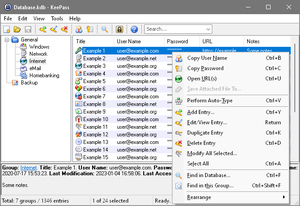
KeePass Password Safe


What is KeePass?
Today you need to remember many passwords. You need a password for the Windows network logon, your e-mail account, your website's FTP password, online passwords (like website member account), etc. etc. etc. The list is endless. Also, you should use different passwords for each account. Because if you use only one password everywhere and someone gets this password you have a problem... A serious problem. The thief would have access to your e-mail account, website, etc. Unimaginable.

KeePass is a free open source password manager, which helps you to manage your passwords in a secure way. You can put all your passwords in one database, which is locked with one master key or a key file. So you only have to remember one single master password or select the key file to unlock the whole database. The databases are encrypted using the best and most secure encryption algorithms currently known (AES and Twofish). For more information, see the features page. 


Is it really free?
Yes, KeePass is really free, and more than that: it is open source (OSI certified). You can have a look at its full source and check whether the encryption algorithms are implemented correctly.

As a cryptography and computer security expert, I have never understood the current fuss about the open source software movement. In the cryptography world, we consider open source necessary for good security; we have for decades. Public security is always more secure than proprietary security. It's true for cryptographic algorithms, security protocols, and security source code. For us, open source isn't just a business model; it's smart engineering practice.

Bruce Schneier, Crypto-Gram 1999/09/15 


..:: Download ::..


..:: CEDIT ::..

Share

Twitter Delicious Facebook Digg Stumbleupon Favorites